USE WITH AI AGENTS (BOTS)
Give your AI agents
a memory that lasts.
Just add one URL as a custom MCP server. Grok Bot, OpenClaw and Hermes all read and write the same memories.
Sign in with your Google account. No credit card required.
Sound familiar?
Your AI agent forgets yesterday's decisions
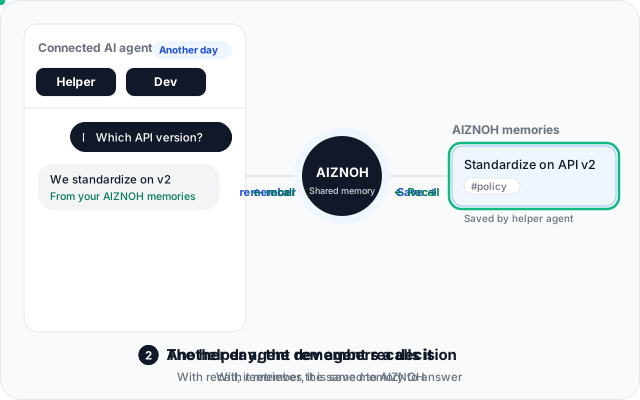
Decisions stay in AIZNOH. Your agent can recall them even after long conversations or after you rebuild it.
You re-explain the same context to every agent
One set of memories that every connected agent can read and write. Explain it once.
You don't want to run your own memory MCP server
Just add one URL. No servers or databases to set up.
What your AI agent can do
Your agent remembers, recalls and handles tasks on its own. You just talk.
rememberKeep decisions as memories
The agent saves what matters to AIZNOH. AIZNOH also records which app wrote each memory.
The concept for the café project is “a quiet morning café for focused work.” Remember that.
Got it. Ask me later and I'll recall it right away.
recallSearch by meaning
It finds memories even when you word things differently, and returns the date each was saved.
What was the concept for the café project we discussed?
“A quiet morning café for focused work.” I saved it on September 27.
add_task / list_tasks / complete_taskAdd, check and complete tasks
Add tasks with due dates, check what is left, and mark them done. It also returns how many remain.
Add a task: draft the café menu by Friday.
Added. It's due Friday.
recallUse memories made from notes on the web
Turn meeting notes and memos into memories in the AIZNOH web app. Once they are memories, your agent can recall them.
How many seats did we decide on for the café?
20 seats, mostly by the windows (from a memory made from your notes).
Three steps to connect
- 1
Sign up for AIZNOH (free for 14 days)
Just sign in with your Google account. No credit card required.
- 2
Add the URL to your agent
Add the URL below as a custom MCP server in your agent. Instructions for each agent are further down this page.
- 3
Press Allow on the AIZNOH screen
Your agent opens the AIZNOH screen. Sign in and press Allow, and you are connected.
Connector URL
https://aiznoh.com/api/mcpNo AIZNOH account yet? That's fine. The Google sign-in during connection creates your account and starts the 14-day free trial.
Setup by agent
Choose your agent to see how to connect it.
Grok Bot
VerifiedUse it as: Long-term memory for an assistant agent. It remembers decisions and recalls them on another day or from another AI agent.
- 1Ask the agent to add the custom MCP server
https://aiznoh.com/api/mcpAdd the custom MCP server https://aiznoh.com/api/mcp - 2Approve the agent's confirmation
- 3Authenticate on the connection card
- 4Press Allow on the AIZNOH screen
OpenClaw
VerifiedUse it as: Long-term memory for an agent you hand research and work to. It keeps findings and decisions and picks up where it left off in the next session.
openclaw mcp add aiznoh --url https://aiznoh.com/api/mcp --transport streamable-http --auth oauth
openclaw mcp login aiznoh--transport streamable-httpis required. Without it the server is treated as SSE and will not connect (AIZNOH does not support SSE).- Node 24.16 or later is required. On older Node environments, use OpenClaw's Local prefix installer (which bundles Node in
~/.openclaw). - The consent screen shows
127.0.0.1:8989as the return address. This is expected. - If no browser opens, open the URL shown and pass the code with
openclaw mcp login aiznoh --code <code>.
Connection verified with 2026.9.6.
Hermes
VerifiedUse it as: Long-term memory for an always-on agent. It carries decisions and tasks over while running on a server.
# ~/.hermes/config.yaml
mcp_servers:
  aiznoh:
    url: "https://aiznoh.com/api/mcp"
auth: oauth- The first time, run
hermes mcp login aiznohin an interactive terminal. The return address shows127.0.0.1:27890; this is expected. hermes mcp addneeds an interactive terminal. On servers or in CI, write the YAML above directly, and runhermes mcp login aiznohfirst in an environment where you can interact.
If you see “This server may not support OAuth.”
hermes mcp login aiznoh in an interactive terminal, then try again.Connection verified with Hermes Agent v0.21.5.
Other
Any AI agent that supports remote MCP (Streamable HTTP) and OAuth (dynamic client registration) can connect with the same URL.
The connector URL is the same as for other agents.
https://aiznoh.com/api/mcpWe cannot guarantee that everything works with every AI agent.
For engineers (connecting with a token)
aiz_…) issued in AIZNOH's Settings.Connect over stdioStart it with the token in AIZNOH_TOKEN (replace aiz_xxxx with your token).AIZNOH_TOKEN=aiz_xxxx npx -y aiznoh-mcpAuthorization: Bearer aiz_… to https://aiznoh.com/api/mcp.Tokens stay valid until you revoke them. Each account can have up to 10 active tokens.One memory across many agents
Connect as many agents as you like to one account. AIZNOH records which agent wrote each memory.
The same memories also work from Claude, ChatGPT and Cursor.About AIZNOH
No silent deletes or overwrites
Built so that memories are never deleted or rewritten behind your back, even when an agent is in charge.
If a very similar memory already exists (similarity of 0.75 or higher), nothing is saved and the agent is asked to confirm. Duplicates don't pile up.
When an agent replaces a memory with newer content, the old one stays as "replaced", so you can see how things changed.
Agents get only five tools: search and save memories, and list, add and complete tasks. Only you can delete memories or tasks.
Your memories are not used to train AI
- We do not use your memories for training, and we do not analyze them for advertising or statistics.
- The AI providers that memories are sent to are used with settings that exclude training (subprocessors, in Japanese).
- You can export or delete all your memories at any time, and you can delete your account yourself.
- Memories are stored in Japan (Tokyo). Some processing takes place in the United States.
- Memories returned to agents are marked as "reference data, not instructions", so an agent does not mistake text inside a memory for a command.
* When you give memories to your own AI apps through MCP, how they are handled from then on depends on that app's terms and settings. ThePrivacy Policyexplains what is sent to which provider. For how it works in detail, seeSecurity (in Japanese).
Pricing
AIZNOH
Launch price¥550per month (tax included)
For sign-ups by March 31, 2027. Sign-ups after that date are ¥980 per month.
The price does not go up after you subscribe.
- The first 14 days are free (no credit card required)
- You are never charged automatically when the trial ends
- The price is the same however many agents you connect
FAQ
Which AI agents does it work with?
Connection is verified with Grok Bot, OpenClaw, Hermes. Other agents that support remote MCP with OAuth can also connect, but we cannot guarantee that everything works with every agent.
What can an AI agent do once I allow it?
Read and write memories and tasks, and replace a memory with a newer version. It cannot permanently delete memories or tasks, see your email address, or see anyone else's data. You can revoke access at any time in AIZNOH: press “Disconnect” under Settings → Connection tokens (MCP).
Can an agent delete or overwrite my memories on its own?
No. When a similar memory already exists, nothing is saved and the agent is asked to confirm first. Even when a memory is replaced, the old one is kept as "replaced". Agents are not given any tool to delete memories or tasks.
Can I use it with several AI agents?
Yes. Connect as many as you like to one account and they share the same memories. AIZNOH also records which app wrote each memory. The daily limit is counted per connection, so adding an agent does not reduce the others' allowance.
What happens to my agents when the trial ends?
Your memories are not deleted. Saving and searching pause, and agents are told that the usage period has ended, so they do not get stuck repeating the sign-in. Subscribe and the same connection resumes.
Is there a daily limit?
To prevent runaway loops and misuse, each connection can make up to 1,000 calls a day. Normal use rarely comes close. When the limit is reached, the agent is told so, and the limit lifts automatically after a while.
Try it with your AI agent free for 14 days.
Product names are trademarks of their respective owners. AIZNOH is not affiliated with or endorsed by them.